Many users search for the difference between dynamic and static because these terms appear in technology, websites, programming, data, content creation, and even everyday discussions. While they sound simple, the meaning can change depending on the context.
In simple words, the difference between dynamic and static is that static things remain fixed and do not change automatically, while dynamic things can change, update, or respond to different conditions. Understanding the difference between dynamic and static helps students, developers, business owners, and digital marketers make better decisions.
This guide explains what dynamic and static mean, how they work, where they are used, and why the difference matters in real-world situations.
Quick Answer: Difference Between Dynamic and Static
A static object, system, or webpage stays the same unless someone manually changes it.
A dynamic object, system, or webpage can change automatically based on user actions, data, or conditions.
Example: A simple company webpage showing fixed contact information is static. A social media feed that updates based on user activity is dynamic.
Definition of Dynamic and Static
- Dynamic: Something that changes, updates, or reacts to different inputs, users, or conditions.
- Static: Something that remains fixed and unchanged unless manually modified.
Example: A printed poster is static, while a digital advertisement that changes based on audience preferences is dynamic.
Pronunciation of Both Terms
| Term | US Pronunciation | UK Pronunciation |
| Dynamic | dye-NAM-ik | dye-NAM-ik |
| Static | STAT-ik | STAT-ik |
Now that the basic definitions are clear, let’s understand how these concepts work in practical situations.
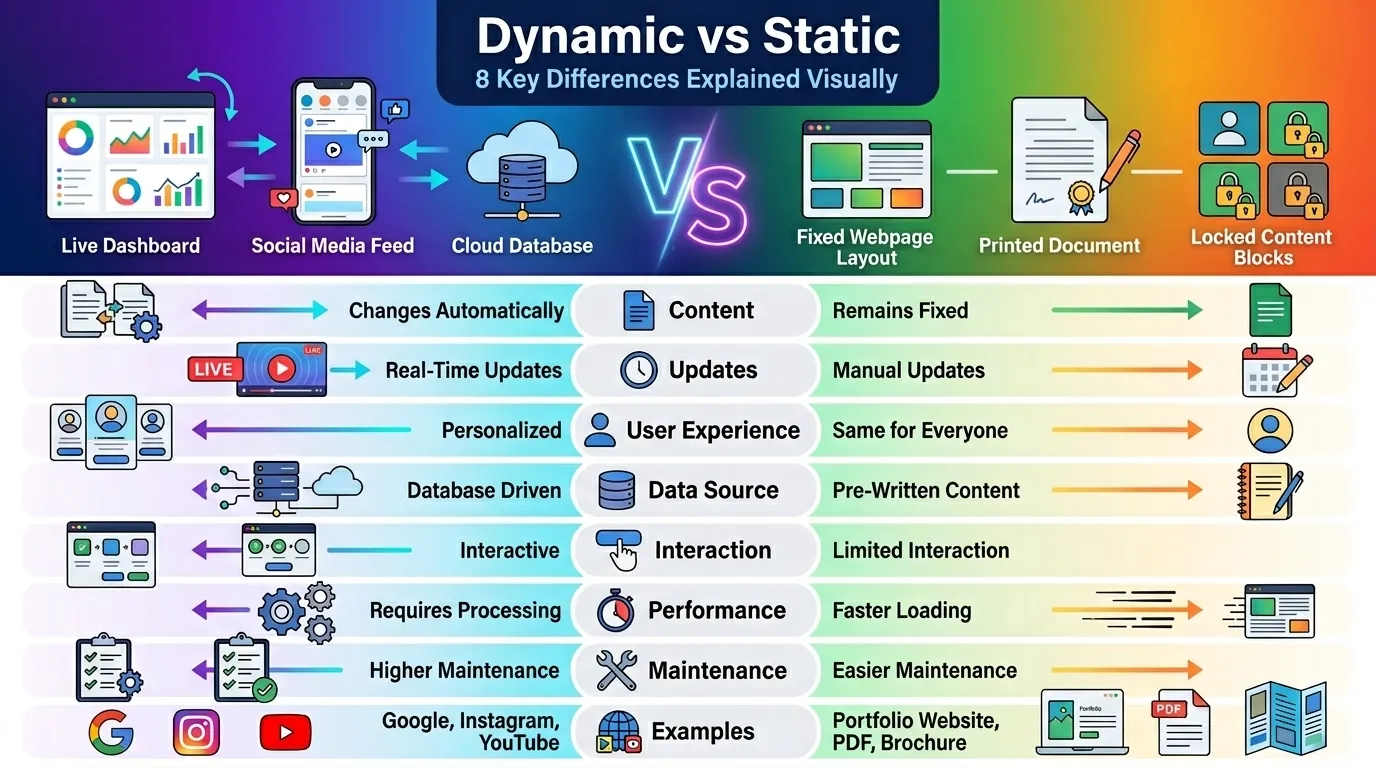
Dynamic vs Static: Comparison Table
| Feature | Dynamic | Static |
| Nature | Changes automatically | Remains fixed |
| User Interaction | Responds to user actions | Same for all users |
| Data Handling | Uses live data | Uses fixed data |
| Updates | Automatic or real-time | Manual updates |
| Complexity | More complex | Simpler |
| Performance | Can require more resources | Usually faster |
| Personalization | Supports customization | Limited customization |
| Examples | Social media feeds, dashboards | Basic HTML pages, posters |
Explanation of Key Comparison Points
| Comparison Point | Dynamic | Static |
| Content | Changes frequently | Rarely changes |
| Maintenance | Requires ongoing management | Easier maintenance |
| Flexibility | Highly flexible | Less flexible |
| Scalability | Better for interactive systems | Suitable for simple systems |
| User Experience | Personalized | Uniform |
| Database Usage | Often connected to databases | Usually database-free |
| Automation | High automation | Low automation |
| Business Applications | E-commerce, SaaS, social platforms | Portfolio sites, landing pages |
Key Differences Explained Between Dynamic and Static
1. Ability to Change
A dynamic system changes based on conditions.
Example: A weather app updates temperatures automatically.
A static system remains the same until manually edited.
Example: A printed weather chart.
2. User Experience
Dynamic platforms provide personalized experiences.
Example: YouTube recommendations differ for every user.
Static platforms display identical information to everyone.
3. Data Usage
Dynamic systems pull information from databases.
Static systems use pre-written content.
4. Maintenance Process
Dynamic environments often require ongoing monitoring.
Static content requires fewer updates.
5. Performance
Static assets generally load faster.
Dynamic assets may require processing before display.
6. Scalability
Dynamic systems can support growing user needs.
Static systems are ideal for simpler requirements.
7. Automation
Dynamic platforms automate many tasks.
Static systems rely more on manual management.
What Is a Dynamic System?
A dynamic system changes according to user behavior, data inputs, or predefined rules.
Examples include:
- Google Search results
- Instagram feeds
- Meta advertising platforms
- YouTube recommendations
- Online banking dashboards
These systems continuously process information to deliver updated experiences.
Why Dynamic Systems Exist
Users expect personalized and real-time information.
Dynamic systems help businesses:
- Improve engagement
- Increase conversions
- Deliver customized experiences
- Handle large amounts of data
What Is a Static System?
A static system presents the same information to every user.
Examples include:
- Printed brochures
- Simple business websites
- PDF documents
- Fixed product catalogs
Why Static Systems Exist
Not every situation requires real-time updates.
Static solutions offer:
- Simplicity
- Speed
- Lower maintenance
- Better security in some cases
Difference Between Dynamic and Static in Websites
One of the most common searches related to this topic involves websites.
Static Websites
A static website displays fixed pages.
Characteristics:
- Fast loading
- Lower hosting requirements
- Simple structure
- Minimal maintenance
Examples:
- Personal portfolios
- Company profile websites
- Event information pages
Dynamic Websites
A dynamic website generates content automatically.
Characteristics:
- Database-driven
- Personalized content
- User accounts
- Interactive features
Examples:
- Google Search
- Facebook by Meta
- YouTube
- Amazon
Most modern web platforms rely heavily on dynamic functionality.
How Do Dynamic and Static Content Differ?
Static Content
Content remains unchanged.
Examples:
- About Us page
- Terms and Conditions
- Contact page
Dynamic Content
Content changes based on user activity or data.
Examples:
- Product recommendations
- News feeds
- Personalized dashboards
Many successful digital businesses combine both approaches.
Why Does the Difference Between Dynamic and Static Matter?
Understanding this distinction helps in decision-making.
For Businesses
Choosing the right approach affects:
- Cost
- Scalability
- Customer experience
- Marketing effectiveness
For Developers
It influences:
- Architecture
- Programming requirements
- Database design
- Performance optimization
For Marketers
Dynamic experiences often improve engagement and conversion rates.
Difference Between Dynamic and Static in Programming
In programming, these terms appear frequently.
Static Programming Elements
Defined before execution.
Examples:
- Static variables
- Static typing
- Fixed memory allocation
Dynamic Programming Elements
Determined during execution.
Examples:
- Dynamic memory allocation
- Runtime data processing
- Dynamic object creation
This flexibility allows software to adapt to changing conditions.
Real-World Examples of Dynamic and Static
Personal Use
Static:
- Printed calendar
Dynamic:
- Google Calendar updates
Business Use
Static:
- Company brochure
Dynamic:
- CRM dashboard with live sales data
Education
Static:
- Textbook
Dynamic:
- Interactive learning platform
E-Commerce
Static:
- Product flyer
Dynamic:
- Online store inventory updates
Social Media
Static:
- Fixed profile information
Dynamic:
- Real-time content feeds
When Should You Use Dynamic Systems?
Choose dynamic solutions when:
- Content changes frequently
- User personalization is needed
- Real-time updates are important
- Large databases are involved
- User interaction is required
Examples include SaaS platforms, social networks, and online marketplaces.
When Should You Use Static Systems?
Choose static solutions when:
- Content rarely changes
- Simplicity is preferred
- Speed is a priority
- Budget is limited
- Minimal maintenance is desired
Examples include portfolios, landing pages, and informational websites.
Difference and Similarity Between Dynamic and Static
| Feature | Dynamic | Static | Similarity |
| Meaning | Changes automatically | Remains fixed | Both deliver information |
| Purpose | Adaptability | Stability | Both solve user needs |
| Maintenance | Frequent | Minimal | Both require management |
| Performance | Processing dependent | Typically faster | Both can perform well |
| User Experience | Personalized | Consistent | Both support usability |
| Data Usage | Live data | Fixed data | Both use content |
| Applications | Interactive platforms | Simple platforms | Both are widely used |
| Business Value | Engagement-focused | Cost-efficient | Both provide value |
This table clearly shows the difference and similarity between dynamic and static for quick understanding.
Common Mistakes with Dynamic and Static
Mistake 1: Assuming Dynamic Means Better
Correction:
Dynamic is not always superior. The best choice depends on the purpose.
Mistake 2: Thinking Static Means Outdated
Correction:
Many high-performing websites still use static architectures.
Mistake 3: Ignoring Costs
Correction:
Dynamic systems usually require more resources.
Mistake 4: Confusing Dynamic Content with Animation
Correction:
Dynamic refers to changing data, not necessarily visual movement.
Mistake 5: Overcomplicating Small Projects
Correction:
Simple projects often work better with static solutions.
Why People Get Confused About Dynamic and Static
Several factors cause confusion:
Multiple Industry Uses
Programming, web development, marketing, and engineering use these terms differently.
Similar Everyday Language
People often associate “dynamic” only with movement.
Technology Trends
Modern platforms emphasize dynamic features, making static solutions seem less important.
Marketing Influence
Companies frequently promote dynamic systems as advanced solutions.
Expert Insight
In practical projects, the best solution is rarely 100% dynamic or 100% static.
Most successful digital products combine both approaches.
For example:
- Homepage content may be static for speed.
- User dashboards may be dynamic for personalization.
This hybrid model balances performance, user experience, scalability, and maintenance costs.
Professionals typically choose the approach that aligns with business goals rather than following trends.
Frequently Asked Questions (FAQ)
What is the main difference between dynamic and static?
Dynamic changes automatically, while static remains fixed until manually updated.
Is a dynamic website better than a static website?
Not always. The best option depends on goals, budget, and functionality requirements.
Why are dynamic websites popular?
They support personalization, user accounts, and real-time updates.
Are static websites faster?
In many cases, yes. Static pages often load more quickly because they require less processing.
Can a website be both dynamic and static?
Yes. Many modern websites combine both approaches.
Is Google dynamic or static?
Google Search is dynamic because results change based on queries and other factors.
Is Instagram dynamic?
Yes. Instagram continuously updates content based on user interactions.
Which is easier to maintain?
Static systems are generally easier to maintain.
Do dynamic systems always use databases?
Often, but not always. Many dynamic applications rely on databases for content generation.
Which option is better for beginners?
Static systems are usually easier to understand and manage initially.
Conclusion
Understanding the difference between dynamic and static is essential in today’s digital world. Dynamic systems are designed to adapt, update, and respond to users or changing conditions. Static systems focus on stability, simplicity, and consistency.
The right choice depends on the goal. If you need personalization, automation, and real-time functionality, a dynamic approach is often the better fit. If you need speed, simplicity, and low maintenance, a static approach may be ideal.
Ultimately, the difference between dynamic and static comes down to one core principle: dynamic systems change automatically, while static systems remain fixed until manually updated. Once this concept is understood, it becomes much easier to evaluate websites, software, content strategies, and technology decisions with confidence.

David Anderson
I am David Anderson, a USA-based content writer and digital author. I create clear, engaging, and well-structured articles focused on delivering valuable and well-researched information. I specialize in blog writing and digital content that helps websites grow visibility and build strong online authority.