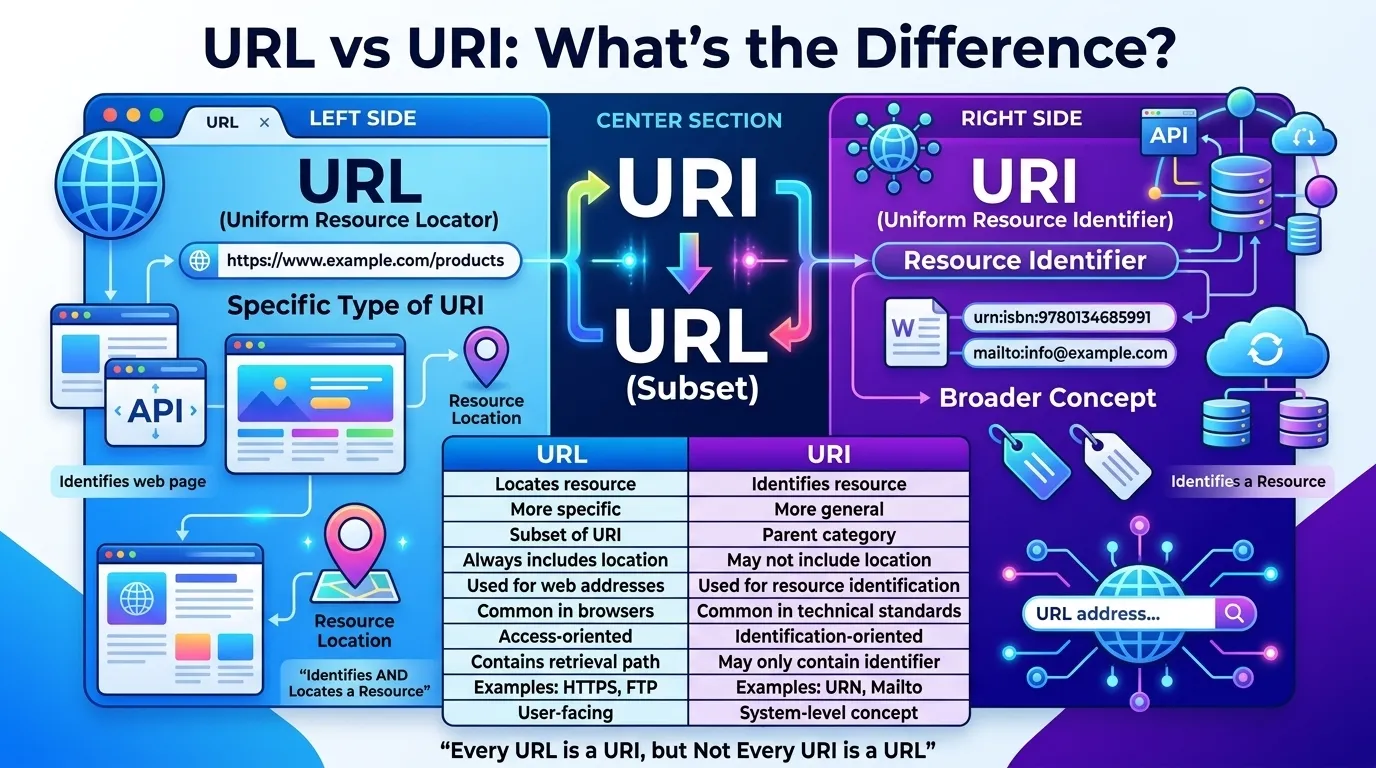
Many users get confused when they hear the terms URL and URI. They often seem identical because people use them interchangeably on websites, in programming, and in technical discussions. However, understanding the difference between both is important for developers, website owners, and even curious internet users.
In simple words, every URL is a URI, but not every URI is a URL. This is the most important concept behind the difference between both. Whether you’re working with websites, APIs, search engines, or web applications, knowing how these identifiers work helps you understand how resources are located and identified online.
In this guide, you’ll learn what a URL is, what a URI is, why they exist, how they work, their similarities, key differences, practical examples, common mistakes, and how search engines like Google use them. By the end, you’ll have complete clarity without needing another article.
Quick Answer: Difference Between Both
A URI (Uniform Resource Identifier) is a general term used to identify a resource.
A URL (Uniform Resource Locator) is a specific type of URI that identifies a resource and tells you where to find it.
Example
- URI:
mailto:info@example.com - URL:
https://www.example.com/about-us
The URL identifies a resource and provides its location, while the URI simply identifies the resource.
Definition of Both
- URI (Uniform Resource Identifier): A string of characters used to identify a resource on the internet or within a system.
- URL (Uniform Resource Locator): A type of URI that identifies a resource and specifies how and where to access it.
Simple Example
This is both a URI and a URL because it identifies the resource and provides its location.
Pronunciation of Both Terms
| Term | US Pronunciation | UK Pronunciation |
|---|---|---|
| URI | yoo-are-eye | yoo-are-eye |
| URL | yoo-are-el | yoo-are-el |
Now that we know what these terms mean, let’s understand their relationship and why they are often confused.
URL vs URI Comparison Table
| Feature | URL | URI |
|---|---|---|
| Full Form | Uniform Resource Locator | Uniform Resource Identifier |
| Purpose | Locates a resource | Identifies a resource |
| Location Information | Always included | May or may not be included |
| Scope | More specific | More general |
| Protocol Required | Usually yes | Not always |
| Resource Access | Shows how to access resource | May only identify resource |
| Web Usage | Common in websites | Used in web standards and computing |
| Relationship | Subset of URI | Parent category |
Key Differences Explained Between Both
1. Purpose
A URI identifies resources, while a URL identifies and locates resources.
Example: A web page address is a URL because it tells browsers where to find the page.
2. Scope
URI is broader. URL is narrower.
Think of URI as a category and URL as one member of that category.
3. Location Information
A URL always contains location details.
A URI may simply identify something without showing its location.
4. Protocol Usage
URLs commonly use protocols such as:
- HTTPS
- HTTP
- FTP
URIs may not require these protocols.
5. Resource Accessibility
URLs are designed to help users access resources directly.
URIs can identify resources even if they cannot be accessed through a browser.
6. Real-World Usage
Most internet users interact with URLs daily.
Developers and system architects often use the broader URI concept.
7. Technical Standards
URI serves as the overarching standard defined by internet specifications.
URL is one implementation within that standard.
What Is a URI and Why Does It Exist?
A URI was created to provide a universal way to identify resources.
Before standardized identifiers, systems used different methods to reference files, services, and web content. URIs solved this problem by creating a consistent identification framework.
Why URIs Matter
- Standardized resource identification
- Improved interoperability
- Better web architecture
- Consistent API communication
Without URIs, modern web technologies would struggle to communicate effectively.
What Is a URL and How Does It Work?
A URL tells a browser exactly where a resource is located and how to retrieve it.
Consider this URL:
It contains:
- Protocol: HTTPS
- Domain: Google
- Path: Search
- Query Parameter: SEO
When you enter this URL, the browser knows where to go and how to request the information.
This makes URLs essential for websites, applications, and online services.
Difference Between Them in Web Development
For developers, understanding the difference is critical.
URI Usage
Used for:
- XML namespaces
- Resource identifiers
- APIs
- Semantic web technologies
URL Usage
Used for:
- Web pages
- Images
- Videos
- Downloadable files
- API endpoints
In practical use, developers often discuss URLs because they interact directly with resource locations.
Why Every URL Is a URI but Not Every URI Is a URL
This is where most beginners become confused.
Imagine a hierarchy:
URI
└── URL
Since URL belongs to the URI family, every URL automatically qualifies as a URI.
However, some URIs identify resources without specifying their location.
Example URI
urn:isbn:9780134685991
This identifies a book but does not tell you where to find it online.
Therefore:
- Every URL = URI
- Not every URI = URL
Difference Between Both in APIs
Modern APIs heavily depend on resource identification.
Example API endpoint:
This URL points to a specific user resource.
The API architecture may use URI concepts to define resources logically while URLs provide actual access points.
This distinction becomes important when designing scalable systems.
Common URI Schemes and URL Schemes
Popular URL Schemes
- HTTPS
- HTTP
- FTP
- SFTP
Common URI Schemes
- mailto
- urn
- tel
- data
Example:
mailto:support@example.com
This is a URI because it identifies an email destination.
It is not traditionally treated as a URL because it does not locate a web resource.
Difference and Similarity Between Both
| Feature | URL | URI | Similarity |
|---|---|---|---|
| Meaning | Locates resource | Identifies resource | Both reference resources |
| Purpose | Find and access | Identify | Both provide resource references |
| Internet Usage | Very common | Common in standards | Both support web technologies |
| Structure | Includes location | May omit location | Both follow standard syntax |
| Protocols | Frequently used | Optional | Both can use schemes |
| Resource Handling | Retrieval focused | Identification focused | Both help systems communicate |
| Web Standards | Specialized type | General standard | Both follow internet standards |
| Technical Role | Practical access | Conceptual identification | Both support web architecture |
This table clearly shows the difference and similarity between both for quick understanding.
Common Mistakes With Both
Mistake 1: Assuming They Mean Exactly the Same Thing
Correction: URL is a subset of URI.
Mistake 2: Calling Every URI a URL
Correction: Some URIs identify resources without locations.
Mistake 3: Ignoring Technical Context
Correction: In software documentation, the distinction may matter.
Mistake 4: Confusing URNs With URLs
Correction: URNs are URIs but not URLs.
Mistake 5: Thinking URLs Only Mean Web Addresses
Correction: URLs can reference resources through multiple protocols.
Real Life Examples With URL and URI
Personal Use
When visiting YouTube:
You are using a URL.
Business Use
A company API endpoint:
This URL helps software retrieve customer data.
Industry Use
Digital libraries may use URNs to identify publications.
Those URNs are URIs but not URLs.
Social Media Example
Platforms like Instagram and Meta use URLs to direct users to profiles, posts, and resources.
Developer Example
Backend systems may store URI references internally while exposing URLs to users.
When to Use Each
Use a URL When
- You need to access a webpage
- You want to retrieve a file
- You are linking content
- You are building websites
Use a URI When
- Defining resources
- Working with XML
- Creating namespaces
- Designing APIs
- Building semantic web applications
Why People Get Confused in Both
Several factors contribute to confusion.
Everyday Usage
Most people only encounter URLs.
Technical Simplification
Many tutorials use URL and URI interchangeably.
Similar Appearance
Both often look like web addresses.
Industry Habits
Even experienced developers sometimes use URL when URI would be technically more accurate.
Why the Difference Between Both Matters Today
In 2026, web applications are more interconnected than ever.
Cloud services, APIs, mobile apps, AI systems, and distributed networks depend heavily on resource identification.
Understanding the difference helps:
- Developers write better documentation
- SEO professionals understand URL structures
- API designers build scalable systems
- Students learn web architecture correctly
Most users won’t notice the distinction daily, but professionals working with web technologies benefit significantly from understanding it.
Expert Insight
From a web architecture perspective, URI is the broader concept that enables standardized resource identification across systems.
In practical scenarios, most beginners only need URLs because they interact directly with websites. However, software engineers, API developers, and standards organizations rely on URI concepts to create interoperable systems.
One insight often missing from competing articles is that the distinction is less about what users see and more about how systems organize and identify resources behind the scenes. That’s why modern frameworks and technical specifications still reference URIs extensively even though URLs dominate everyday conversations.
Frequently Asked Questions (FAQs)
What is the main difference between URL and URI?
A URL locates a resource, while a URI identifies a resource.
Is every URL a URI?
Yes. Every URL is considered a URI.
Is every URI a URL?
No. Some URIs identify resources without specifying their location.
What does URI stand for?
URI stands for Uniform Resource Identifier.
What does URL stand for?
URL stands for Uniform Resource Locator.
Why do developers use URI instead of URL?
Because URI is the broader and technically accurate term when discussing resource identification.
What is an example of a URI that is not a URL?
urn:isbn:9780134685991
Are URLs important for SEO?
Yes. Search engines use URLs to understand, crawl, and index web pages.
Does Google care about URL structure?
Yes. Clear and descriptive URLs improve usability and help search engines understand content.
Conclusion
Understanding the difference between URL and URI is easier once you know their relationship. A URI is the broader concept used to identify resources, while a URL is a specific type of URI that also tells you where a resource is located and how to access it.
The simplest way to remember it is this: every URL is a URI, but not every URI is a URL. This distinction may seem small, but it plays an important role in web standards, APIs, SEO, software development, and modern internet architecture.
As web applications continue evolving in 2026 and beyond, understanding the difference between both helps you communicate more accurately, design better systems, and build a stronger foundation in web technology. If you remember one thing from this article, remember this rule: URL is a subset of URI, and URI is the larger category that makes standardized resource identification possible.

David Anderson
I am David Anderson, a USA-based content writer and digital author. I create clear, engaging, and well-structured articles focused on delivering valuable and well-researched information. I specialize in blog writing and digital content that helps websites grow visibility and build strong online authority.