Many users get confused when choosing between MP3 and M4A. Both are popular audio file formats, but they work differently and offer different benefits. If you’ve ever downloaded music, edited a podcast, uploaded audio to YouTube, or transferred songs to your smartphone, you’ve likely encountered this comparison.
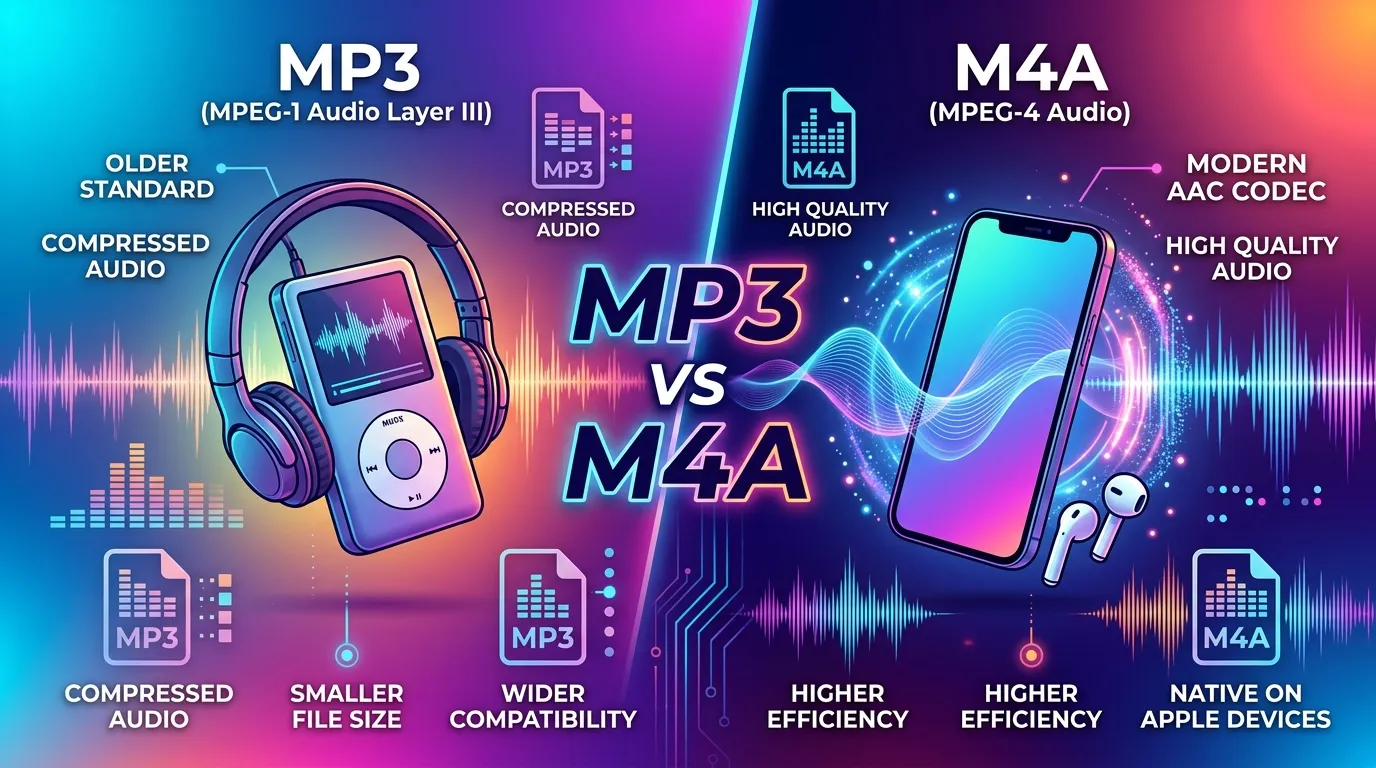
The Difference Between MP3 and M4A mainly comes down to audio quality, compression efficiency, compatibility, and file size. While MP3 remains the most widely supported format worldwide, M4A often delivers better sound quality at smaller file sizes.
In this guide, you’ll learn the complete Difference Between MP3 and M4A, including definitions, pronunciation, technical comparisons, real-world examples, common mistakes, practical use cases, and expert insights. By the end, you’ll know exactly which format fits your needs.
Quick Answer: Difference Between MP3 and M4A
The main difference between MP3 and M4A is that MP3 offers universal compatibility, while M4A provides better audio quality at the same bitrate.
Example:
A 128 kbps M4A music file typically sounds clearer than a 128 kbps MP3 file while using a similar amount of storage.
Definition of Difference Between MP3 and M4A
- MP3: A digital audio format that compresses sound files to reduce storage size while maintaining acceptable audio quality.
- M4A: An audio container format commonly using AAC (Advanced Audio Coding) compression, designed to deliver better sound quality than MP3 at similar bitrates.
Simple Example:
A song saved as MP3 may be playable almost everywhere, while the same song saved as M4A may sound slightly better.
Pronunciation of Both Formats
| Format | US Pronunciation | UK Pronunciation |
|---|---|---|
| MP3 | Em-Pee-Three | Em-Pee-Three |
| M4A | Em-Four-Ay | Em-Four-Ay |
Now that you know what these formats are and how they’re pronounced, let’s understand the real differences that matter in everyday use.
MP3 vs M4A: Comparison Table
| Feature | MP3 | M4A |
|---|---|---|
| Compression Method | MPEG Audio Layer III | Usually AAC Compression |
| Audio Quality | Good | Better at same bitrate |
| File Size | Slightly larger | Often smaller |
| Compatibility | Nearly universal | Modern devices support it |
| Streaming Efficiency | Good | Excellent |
| Metadata Support | Basic | Advanced |
| Apple Ecosystem | Supported | Native format |
| Editing Flexibility | Widely supported | Growing support |
| Patent Status | Mostly unrestricted | Depends on codec usage |
| Popular Usage | Music sharing | Streaming and mobile audio |
Key Differences Explained Between MP3 and M4A
1. Audio Quality
M4A usually produces clearer and richer sound than MP3 at the same bitrate.
Example: A 128 kbps AAC M4A file may sound similar to a 192 kbps MP3 file.
2. File Size Efficiency
M4A compression is more efficient.
Example: You can store more songs on a smartphone using M4A files.
3. Device Compatibility
MP3 works on almost every device.
Example: Older car stereos often support MP3 but may not recognize M4A.
4. Streaming Performance
Most modern streaming platforms use AAC-based formats similar to M4A.
5. Mobile Optimization
M4A is commonly optimized for smartphones and tablets.
6. Professional Audio Use
Podcasters and content creators often prefer M4A because of improved efficiency.
7. Legacy Support
MP3 remains the safest option for older hardware.
8. Ecosystem Integration
Apple devices work exceptionally well with M4A files.
What Is MP3 and Why Was It Created?
MP3 revolutionized digital music during the internet boom.
Before MP3, audio files consumed large amounts of storage. Slow internet connections made sharing music difficult. MP3 solved this problem by compressing audio dramatically while keeping acceptable sound quality.
In practical use, MP3 helped create the digital music era. Early music players, portable devices, and online music libraries depended heavily on this format.
Even in 2026, MP3 remains one of the most recognized audio formats because of its unmatched compatibility.
What Is M4A and How Does It Work?
M4A is a modern audio container format that frequently uses AAC encoding.
AAC was developed as an improvement over MP3. The goal was simple:
- Better sound quality
- Smaller files
- Improved compression efficiency
When streaming music on platforms such as YouTube Music, many modern services rely on AAC-based technology because it delivers better listening experiences without increasing bandwidth usage.
This efficiency explains why M4A has become popular among smartphone users and content creators.
Difference Between MP3 and M4A for Audio Quality
One of the most searched questions is:
Which sounds better: MP3 or M4A?
In most listening tests, M4A wins.
Why?
AAC compression preserves more audio details during encoding.
This becomes noticeable when listening to:
- Acoustic music
- Classical recordings
- Podcasts
- High-quality headphones
- Studio monitors
Most beginners may not hear dramatic differences on basic speakers, but audio enthusiasts often notice improved clarity in M4A files.
Quick Summary
- Casual listening → Both sound good.
- Critical listening → M4A often sounds better.
Difference Between MP3 and M4A for File Size
Storage matters.
Whether you’re saving thousands of songs or managing cloud storage, file size can become important.
MP3
Requires slightly higher bitrates to achieve excellent quality.
M4A
Maintains quality at lower bitrates.
Real Scenario:
A music library containing 10,000 songs may consume noticeably less storage when encoded as M4A instead of MP3.
This advantage becomes even more valuable on mobile devices.
Which Format Works Better on Modern Platforms?
Today’s digital ecosystem includes:
- Google services
- YouTube platforms
- Smartphones
- Smart TVs
- Streaming applications
- Cloud storage systems
MP3 Strength
Universal playback.
M4A Strength
Modern optimization.
Many streaming systems use AAC technology because it balances quality and bandwidth efficiently.
For example:
- YouTube processes audio using modern codecs.
- Mobile operating systems optimize AAC playback.
- Streaming services prioritize efficient compression.
This is one reason M4A remains highly relevant today.
Difference Between MP3 and M4A for Content Creators
Creators often ask:
Which format should I upload?
The answer depends on your workflow.
Podcast Creators
M4A often provides better quality-to-size ratio.
Video Creators
Both formats work, but AAC-based files are commonly preferred.
Music Producers
High-quality exports may begin in lossless formats before being converted into MP3 or M4A.
Business Training Platforms
Many educational systems use M4A because bandwidth savings become significant at scale.
Difference and Similarity Table Generation for Difference Between MP3 and M4A
| Feature | MP3 | M4A | Similarity |
|---|---|---|---|
| Purpose | Digital audio storage | Digital audio storage | Both store audio content |
| Compression | Lossy compression | Usually AAC lossy compression | Both reduce file size |
| Audio Quality | Good quality | Better at equal bitrate | Both support high-quality playback |
| Compatibility | Very high | High on modern devices | Both work on many platforms |
| Streaming Use | Common | Very common | Both used online |
| Music Storage | Excellent | Excellent | Both organize music libraries |
| Mobile Usage | Supported | Optimized | Both play on smartphones |
| Metadata | Supported | Advanced support | Both store song information |
This table clearly shows the difference and similarity between Difference Between MP3 and M4A for quick understanding.
Common Mistakes with Difference Between MP3 and M4A
Mistake 1: Assuming M4A Is Always Lossless
Correction: Most M4A files use AAC and are still lossy.
Mistake 2: Thinking MP3 Has Better Quality
Correction: At the same bitrate, M4A often sounds better.
Mistake 3: Ignoring Device Compatibility
Correction: Older devices may prefer MP3.
Mistake 4: Converting MP3 to M4A for Quality Improvement
Correction: Conversion cannot restore lost audio data.
Mistake 5: Choosing Format Based Only on File Size
Correction: Quality and compatibility matter too.
Real-Life Examples with Difference Between MP3 and M4A
Personal Use
A student stores music on a smartphone and chooses M4A to save space.
Car Audio System
A driver uses MP3 because the vehicle’s media player supports it reliably.
Podcast Production
A podcaster exports episodes in M4A for efficient distribution.
Business Training Portal
A company hosts hundreds of audio lessons and prefers M4A to reduce bandwidth costs.
Professional Media Workflow
Editors archive masters separately and create MP3 or M4A versions for delivery.
When to Use Each Format
Use MP3 When:
- Maximum compatibility is required
- Sharing files with unknown users
- Using older hardware
- Uploading to systems with limited format support
Use M4A When:
- Audio quality matters
- Storage space is limited
- Using modern smartphones
- Streaming efficiency is important
- Managing large music libraries
Why People Get Confused in Difference Between MP3 and M4A
Several factors create confusion:
Similar Purpose
Both formats store audio files.
Hidden Technology
Most users don’t realize M4A commonly uses AAC encoding.
Marketing Language
Some software promotes formats without explaining technical differences.
Device Variations
One device may support both formats while another favors only one.
Audio Perception
Not everyone hears compression differences equally.
Expert Insight
From an audio engineering perspective, neither format is universally “best.”
In real scenarios, professionals select formats based on purpose rather than popularity.
For maximum compatibility, MP3 remains the safest choice.
For better efficiency and sound quality, M4A is generally the stronger modern option.
Most beginners focus only on file size, but experienced creators evaluate three factors together:
- Quality
- Compatibility
- Workflow requirements
That balanced approach usually produces the best results.
Frequently Asked Questions (FAQ)
Is M4A better than MP3?
Usually yes. M4A often provides better audio quality at the same bitrate.
Which file is smaller, MP3 or M4A?
M4A is typically more efficient and may produce smaller files.
Can all devices play M4A?
Most modern devices can, but some older systems may not.
Why is MP3 still popular?
Its universal compatibility keeps it relevant.
Is M4A good for podcasts?
Yes. Many podcasters prefer it because of efficient compression.
Can I convert MP3 to M4A?
Yes, but audio quality will not improve.
Does YouTube use MP3?
YouTube generally processes uploaded audio into its own optimized formats.
Which format should I choose for music?
Choose MP3 for compatibility and M4A for quality efficiency.
Is M4A lossless?
Not necessarily. Most M4A files use AAC compression, which is lossy.
Which format is best in 2026?
For most modern users, M4A offers the best balance of quality and storage efficiency.
Conclusion
Understanding the Difference Between MP3 and M4A helps you make smarter decisions when storing, sharing, streaming, or creating audio content. MP3 remains the king of compatibility, working on almost every device and platform. M4A, on the other hand, uses more advanced compression technology that often delivers better audio quality while keeping file sizes smaller.
The final answer is simple: choose MP3 for universal support and M4A for better efficiency and sound quality. The right choice depends on how and where you plan to use your audio files. Once you understand that balance, the difference between MP3 and M4A becomes much easier to navigate.

Sarfraz Ahmad is language researcher and content writer who specializes in explaining the difference between commonly confused English words. Through WordClearify, learners understand subtle word distinctions in a simple, structured, and practical way. My writing focuses on clarity, real-life examples, and easy comparisons for students, bloggers, and professionals worldwide.