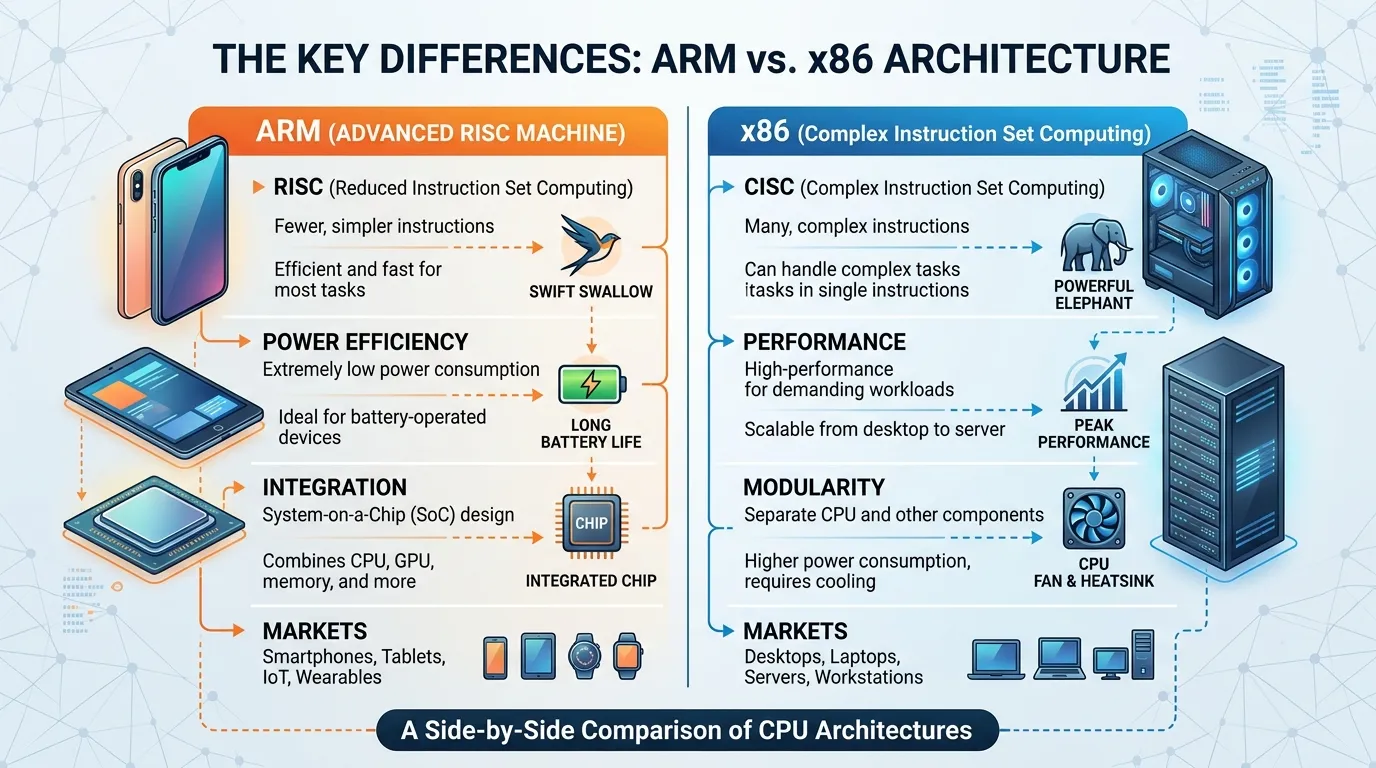
If you have ever compared a smartphone processor with a laptop CPU, you have probably encountered the Difference Between ARM and x86. Many users get confused because both architectures power modern devices, yet they work in very different ways.
The Difference Between ARM and x86 mainly comes down to instruction design, power efficiency, performance characteristics, and intended use cases. ARM dominates smartphones, tablets, and energy-efficient devices, while x86 has traditionally powered desktops, laptops, and servers.
In this guide, you’ll learn the Difference Between ARM and x86, how each architecture works, why companies are increasingly adopting ARM chips, and which option is better for different real-world scenarios. Whether you’re a beginner, developer, gamer, or IT professional, this article covers everything you need to know.
Quick Answer: Difference Between ARM and x86
ARM and x86 are two different CPU architectures.
- ARM focuses on power efficiency and lower energy consumption.
- x86 focuses on maximum compatibility and high-performance computing.
For example, most modern smartphones use ARM processors, while many Windows PCs still rely on x86 processors from companies like Intel and AMD.
Definition of Difference Between ARM and x86
- ARM: A Reduced Instruction Set Computing (RISC) architecture designed for efficiency, low power consumption, and mobile computing.
- x86: A Complex Instruction Set Computing (CISC) architecture developed for desktops, laptops, workstations, and servers requiring broad software compatibility.
Example: An iPhone processor uses ARM architecture, while a traditional desktop computer often uses x86 architecture.
Pronunciation of Both Terms (US & UK)
| Term | US Pronunciation | UK Pronunciation |
|---|---|---|
| ARM | /ɑːrm/ | /ɑːm/ |
| x86 | /eks-eɪ-ti-sɪks/ | /eks-eɪ-ti-sɪks/ |
Now that we understand the basics, let’s explore what truly separates these two processor architectures.
Difference Between ARM and x86 Comparison Table
| Feature | ARM | x86 |
|---|---|---|
| Architecture Type | RISC | CISC |
| Power Consumption | Very low | Higher |
| Battery Life | Excellent | Moderate |
| Performance Per Watt | Outstanding | Good |
| Software Compatibility | Growing rapidly | Extensive |
| Mobile Devices | Dominates market | Rare |
| Desktop Computing | Increasing adoption | Traditional leader |
| Heat Generation | Lower | Higher |
| Manufacturing Focus | Efficiency | Raw performance |
| Common Users | Smartphones, tablets, embedded systems | PCs, servers, gaming rigs |
Key Differences Explained Between ARM and x86
1. Instruction Set Design
ARM uses a simplified instruction set, making execution faster and more efficient.
x86 uses more complex instructions capable of performing multiple operations at once.
Real-world example: A smartphone running all day on a small battery benefits from ARM’s simplicity.
2. Power Efficiency
ARM processors consume significantly less power.
This is one reason companies like Apple transitioned many products toward ARM-based chips.
3. Software Compatibility
x86 has decades of software support.
Many enterprise applications, legacy business tools, and older PC games were originally built for x86 systems.
4. Thermal Performance
ARM chips generally produce less heat.
As a result, many devices operate without large cooling systems or fans.
5. Performance Scaling
Modern ARM processors have become extremely powerful.
Meanwhile, x86 continues to excel in workloads demanding maximum raw performance.
6. Mobile Market Presence
Almost every Android smartphone and iPhone uses ARM architecture.
This dominance comes from efficiency and battery optimization.
7. Server Adoption
Cloud providers increasingly deploy ARM servers because they reduce electricity costs.
8. Cost Efficiency
ARM-based solutions often reduce operational expenses through lower energy requirements.
What Is ARM Architecture and Why Was It Created?
ARM architecture was designed around efficiency.
Instead of creating highly complex instructions, ARM focuses on performing tasks using simpler operations. This approach reduces power usage and heat generation.
Today ARM processors power:
- Smartphones
- Tablets
- Smart TVs
- Wearables
- IoT devices
- Modern laptops
- Cloud servers
The architecture became popular because mobile devices needed long battery life without sacrificing performance.
What Is x86 Architecture and Why Is It Still Popular?
x86 architecture originated in personal computing.
Over decades, software developers built millions of applications specifically for x86 processors. This massive ecosystem remains one of x86’s biggest advantages.
x86 powers:
- Desktop PCs
- Gaming computers
- Workstations
- Enterprise servers
- Professional software platforms
Despite increased ARM adoption, x86 remains essential because of software compatibility and established infrastructure.
How Does ARM Work Compared to x86?
The easiest way to understand the Difference Between ARM and x86 is to think of instructions.
ARM Approach
ARM prefers fewer, simpler instructions.
Benefits include:
- Lower energy use
- Faster execution cycles
- Better battery life
- Less heat
x86 Approach
x86 uses more sophisticated instructions.
Benefits include:
- Broad compatibility
- Strong legacy support
- High-performance workloads
- Extensive software ecosystem
In simple words, ARM prioritizes efficiency while x86 prioritizes compatibility and versatility.
Difference Between ARM and x86 for Gaming
Gaming is one of the most searched comparisons.
ARM Gaming Advantages
- Better battery life
- Efficient mobile gaming
- Growing support for cloud gaming
x86 Gaming Advantages
- Wider game compatibility
- Strong GPU ecosystem
- Better support for older titles
- Extensive Windows game library
For serious PC gamers, x86 still has an advantage. However, ARM gaming performance improves every year.
Difference Between ARM and x86 for Laptops
The laptop market has changed dramatically.
ARM Laptops
Advantages:
- Exceptional battery life
- Silent operation
- Lower temperatures
- Instant wake-up
x86 Laptops
Advantages:
- Better software compatibility
- Wider hardware support
- Established business ecosystem
For students and everyday users, ARM laptops have become increasingly attractive.
For specialized software users, x86 may still be the safer choice.
Why Are Major Technology Companies Moving Toward ARM?
Several major technology companies now invest heavily in ARM.
Examples include:
- Apple
- Qualcomm
- NVIDIA
- Amazon
The primary reason is efficiency.
Data centers spend enormous amounts on electricity. Even small efficiency improvements can save millions of dollars annually.
For consumer devices, longer battery life directly improves user experience.
Difference Between ARM and x86 in Servers and Cloud Computing
Cloud computing has become a major battleground.
Organizations running thousands of servers increasingly evaluate ARM-based infrastructure because:
- Lower power consumption
- Reduced cooling costs
- Better performance per watt
- Improved scalability
Meanwhile, x86 continues to dominate many enterprise environments because existing software and infrastructure were built around it.
Difference Between ARM and x86: Similarity and Difference Table
| Feature | ARM | x86 | Similarity |
|---|---|---|---|
| Purpose | Run computing tasks efficiently | Run computing tasks efficiently | Both execute software instructions |
| CPU Architecture | RISC-based | CISC-based | Both process data |
| Operating Systems | Supports Windows, Linux, Android | Supports Windows, Linux | Both support major operating systems |
| Multicore Processing | Yes | Yes | Both use multiple cores |
| Security Features | Advanced security support | Advanced security support | Both prioritize system security |
| Server Usage | Increasing adoption | Traditional leader | Both power cloud infrastructure |
| Consumer Devices | Mobile-focused | PC-focused | Both serve end users |
| AI Workloads | Growing rapidly | Strong support | Both handle AI applications |
This table clearly shows the difference and similarity between Difference Between ARM and x86 for quick understanding.
Common Mistakes with Difference Between ARM and x86
Mistake 1: Assuming ARM Is Always Slower
Modern ARM processors can rival or exceed many traditional x86 chips.
Mistake 2: Thinking x86 Is Outdated
x86 remains critical for gaming, enterprise software, and workstation computing.
Mistake 3: Ignoring Software Compatibility
Hardware performance means little if required applications cannot run properly.
Mistake 4: Comparing Only Clock Speed
Architecture design matters more than raw GHz numbers.
Mistake 5: Believing One Architecture Will Completely Replace the Other
Both architectures continue serving different needs and markets.
Real-Life Examples with Difference Between ARM and x86
Personal Use
A student using a lightweight laptop for browsing and note-taking may prefer ARM for battery life.
Business Use
A company running legacy accounting software may choose x86 systems for compatibility.
Mobile Industry
Android smartphones rely heavily on ARM processors for efficiency.
Content Creation
Professional video editors often use powerful x86 workstations for demanding workloads.
Cloud Services
Large cloud providers deploy ARM servers to reduce energy costs.
When to Use Each
Choose ARM When:
- Battery life matters
- You use mobile devices
- Energy efficiency is important
- You need cooler operation
- Cloud cost optimization is a priority
Choose x86 When:
- Running legacy software
- Gaming extensively
- Using specialized enterprise applications
- Needing maximum software compatibility
- Managing existing PC infrastructure
Why People Get Confused in Difference Between ARM and x86
Several factors create confusion:
Rapid Technological Change
ARM performance has improved dramatically in recent years.
Marketing Messages
Manufacturers often emphasize benchmark numbers without explaining architecture differences.
Software Translation Technologies
Modern operating systems can run some applications across architectures, making distinctions less obvious.
Mixed Device Ecosystems
Users may own ARM phones, ARM tablets, and x86 desktops simultaneously.
Expert Insight
From an industry perspective, the future is unlikely to be a winner-takes-all battle.
In real scenarios, ARM excels where efficiency, battery life, and scalability matter most. x86 remains highly valuable where compatibility, gaming, and enterprise workloads dominate.
Most beginners focus solely on performance benchmarks. Professionals often look deeper at factors like software ecosystems, deployment costs, maintenance requirements, and long-term scalability.
The smartest choice is not asking which architecture is universally better. Instead, ask which architecture is better for your specific workload.
Frequently Asked Questions (FAQs)
Is ARM better than x86?
Not universally. ARM excels in efficiency, while x86 excels in compatibility and traditional desktop computing.
Why do smartphones use ARM?
ARM consumes less power and delivers excellent battery life.
Can ARM run Windows?
Yes. Modern Windows versions support ARM processors.
Is x86 faster than ARM?
It depends on the workload, software optimization, and processor generation.
Do ARM processors generate less heat?
Generally, yes. ARM architectures are known for lower power consumption and reduced heat output.
Which architecture is better for gaming?
Currently, x86 offers broader game compatibility and stronger support.
Are cloud providers adopting ARM?
Yes. Many cloud providers use ARM servers to reduce energy costs.
Will ARM replace x86 completely?
Most experts believe both architectures will continue to coexist for different use cases.
Which is better for battery life?
ARM is generally superior for battery efficiency.
What is the biggest difference between ARM and x86?
The biggest difference is architecture design: ARM uses RISC principles, while x86 uses CISC principles.
Conclusion
Understanding the Difference Between ARM and x86 is increasingly important in 2026 because both architectures power major segments of modern computing. ARM focuses on efficiency, battery life, lower heat output, and scalable performance, making it ideal for smartphones, tablets, modern laptops, and cloud infrastructure. x86 focuses on compatibility, software support, gaming performance, and traditional computing workloads.
The right choice depends entirely on your needs. If portability, battery life, and energy efficiency matter most, ARM is often the better option. If you rely on legacy software, extensive gaming libraries, or enterprise applications, x86 may remain the stronger choice.

Sarfraz Ahmad is language researcher and content writer who specializes in explaining the difference between commonly confused English words. Through WordClearify, learners understand subtle word distinctions in a simple, structured, and practical way. My writing focuses on clarity, real-life examples, and easy comparisons for students, bloggers, and professionals worldwide.