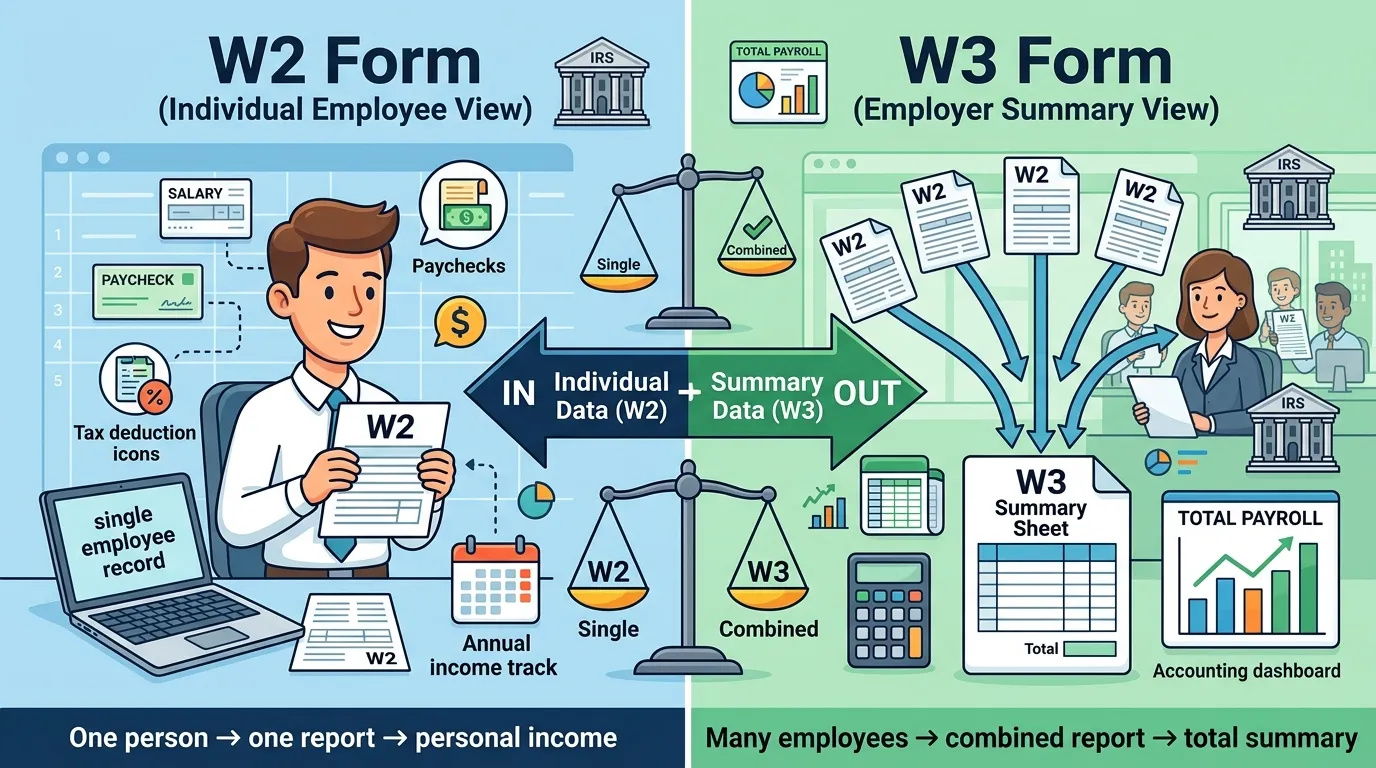
Many people search for the difference between W2 and W3 because both forms are connected to taxes, payroll, and employee income reporting. At first glance, they look almost the same. But in reality, they serve very different purposes.
In simple words, a W2 form reports one employee’s wages and taxes, while a W3 form summarizes all employee W2 forms for the employer. This confusion is common among employees, HR beginners, freelancers moving into full-time jobs, and even small business owners using payroll software for the first time.
If you have searched “what is W2,” “what is W3,” “how does W2 work,” or “difference between W2 and W3,” this guide gives you a complete answer in one place. You will learn definitions, real-life examples, payroll logic, filing differences, similarities, common mistakes, and expert insights used in modern payroll systems powered by companies like ADP, Gusto, and QuickBooks Payroll.
Quick Answer: Difference Between W2 and W3
The main difference between W2 and W3 is:
- W2 = Individual employee wage and tax report
- W3 = Employer summary of all W2 forms
Real Example
Imagine a company has 15 employees:
- Each employee receives their own W2 form.
- The employer submits one W3 form summarizing all 15 W2 forms to the Social Security Administration.
Definition of Both
- W2: A tax form employers give employees showing annual wages and taxes withheld.
- W3: A summary form employers send with all W2 forms to report total payroll information.
Simple Example
1 employee = 1 W2
All employee W2 totals together = 1 W3
Pronunciation of Both Terms
| Term | US Pronunciation | UK Pronunciation |
| W2 | “Double-you two” | “Double-you two” |
| W3 | “Double-you three” | “Double-you three” |
Now that the basics are clear, let’s understand how these forms actually work in real payroll systems and why businesses must use both correctly.
Difference Between W2 and W3 Comparison Table
| Feature | W2 | W3 | Similarity |
| Purpose | Reports one employee’s earnings | Summarizes all employee earnings | Both are payroll tax forms |
| Used By | Employees and tax agencies | Employers and tax agencies | Both support tax compliance |
| Filing Type | Individual reporting | Summary reporting | Both are annual filings |
| Number Issued | One per employee | One per employer | Both relate to payroll |
| Main Audience | Employee | Government agencies | Both contain wage data |
| Information Level | Detailed employee data | Combined company totals | Both include taxes and wages |
| Payroll Role | Employee income reporting | Payroll reconciliation | Both connect to payroll systems |
| Tax Season Use | Employee tax filing | Employer submission process | Both are used yearly |
This table clearly shows the difference and similarity between W2 and W3 for quick understanding.
Key Differences Explained Between W2 and W3
1. Individual Form vs Summary Form
A W2 focuses on one employee only. A W3 combines totals from every employee’s W2.
Real-Life Example
A retail store with 25 employees creates:
- 25 W2 forms
- 1 W3 summary form
This is the core difference between W2 and W3.
2. Employees Receive W2, Not W3
Employees use W2 forms for tax filing. Most workers never even see a W3 form.
The W3 is mainly handled by:
- HR departments
- payroll teams
- accountants
- payroll software systems
3. W2 Contains Detailed Information
A W2 includes:
- wages
- tips
- federal tax withheld
- Social Security tax
- Medicare tax
- state taxes
A W3 only contains combined totals.
4. W3 Acts Like a Payroll Summary
Think of the W3 as a “master report” for all W2 forms.
It helps the Social Security Administration verify that payroll totals match correctly.
5. Different User Intent
People search for W2 forms because they need:
- tax filing documents
- proof of income
- loan applications
Businesses use W3 forms for:
- payroll reconciliation
- tax reporting
- compliance verification
6. Error Impact Is Different
A mistake on one W2 affects one employee.
A mistake on the W3 can affect the employer’s entire payroll filing.
In practical use, payroll departments double-check W3 totals carefully.
7. Filing Workflow Is Different
The W2 is generated employee by employee.
The W3 is generated after all W2 forms are completed.
Most payroll systems automate this process today.
8. Government Processing Logic
The Internal Revenue Service and the Social Security Administration use W3 totals to validate W2 data accuracy.
If totals do not match, employers may receive notices or correction requests.
9. Accessibility Difference
Employees can usually download W2 forms from HR portals.
W3 forms are generally internal employer records.
10. Compliance Importance
Both forms are legally important, but the W3 helps prove that payroll totals are consistent across the organization.
This matters more than many beginners realize.
What Is a W2 Form and Why Does It Exist?
A W2 form exists to help employees and government agencies track yearly income and tax withholding.
Without W2 forms:
- employees could not properly file taxes,
- employers could not verify payroll records,
- and tax agencies could not monitor withholding accuracy.
Common Information Included in W2
- Gross wages
- Federal tax withheld
- Social Security wages
- Medicare wages
- State income tax
- Retirement contributions
Real-World Use Cases
People often use W2 forms when:
- applying for mortgages,
- renting apartments,
- verifying employment,
- filing tax returns,
- applying for financial aid.
Platforms like TurboTax and H&R Block rely heavily on W2 imports during tax season.
What Is a W3 Form and How Does It Work?
A W3 form works as a payroll summary sheet for all employee W2 forms.
In simple words:
- W2 = employee detail
- W3 = company totals
How the System Works
The employer:
- Creates all employee W2 forms
- Calculates total wages and taxes
- Generates one W3 summary
- Submits records to government agencies
Example
If all employee wages equal $1.2 million:
- all W2 totals combined should equal $1.2 million,
- and the W3 must match exactly.
This matching process is extremely important for payroll compliance.
Why People Get Confused About the Difference Between Both
Many users get confused because:
- both forms use similar names,
- both appear during tax season,
- both involve payroll information,
- and both are handled by employers.
But there is another reason too.
Most employees only interact with W2 forms. They rarely see W3 forms because payroll software handles them automatically behind the scenes.
Modern systems like Paychex and Rippling generate W3 forms automatically after payroll calculations are complete.
That automation hides the process from everyday workers.
Difference Between W2 and W3 in Modern Payroll Software
Modern payroll systems have changed how businesses handle tax forms.
Today, companies using:
- Workday
- BambooHR
- Oracle PeopleSoft
can generate W2 and W3 forms automatically.
Why This Matters
Automation helps:
- reduce payroll mistakes,
- improve filing accuracy,
- speed up tax reporting,
- simplify compliance.
Still, employers remain legally responsible for correct information.
That is a critical payroll rule many beginners overlook.
Common Mistakes With W2 and W3
1. Thinking W2 and W3 Are the Same
This is the most common beginner mistake.
Fix:
Remember:
- W2 = employee form
- W3 = employer summary
2. Filing Incorrect Payroll Totals
If W2 totals do not match the W3, government systems may flag the filing.
Fix:
Always reconcile payroll reports before submission.
3. Missing Filing Deadlines
Late submissions may result in penalties.
Fix:
Use payroll reminders or automated filing systems.
4. Incorrect Employee Information
Wrong Social Security numbers create payroll problems quickly.
Fix:
Verify employee data before generating forms.
5. Ignoring Corrections
Some employers delay fixing payroll errors.
Fix:
Submit corrections immediately after discovering mistakes.
Real Life Examples With Difference Between Both
Example 1: Small Business Payroll
A bakery owner with 6 employees:
- creates 6 W2 forms,
- files 1 W3 summary.
Example 2: Corporate Payroll Department
A large company using SAP Success Factors may process thousands of employee W2 forms automatically.
Example 3: Employee Tax Filing
An employee downloads a W2 form from an HR portal and files taxes online.
They never interact with the W3 directly.
Example 4: Mortgage Approval
Banks often request W2 forms as proof of stable income.
W3 forms are not used in this situation.
Example 5: Government Payroll Verification
The Social Security Administration checks W3 totals against all submitted W2 forms.
When To Use Each
| Situation | Use W2 | Use W3 |
| Filing personal taxes | Yes | No |
| Reporting employee wages | Yes | No |
| Submitting payroll totals | No | Yes |
| Employer compliance reporting | Yes | Yes |
| Income verification | Yes | Rarely |
| Payroll auditing | Yes | Yes |
Expert Insight: What Payroll Professionals Know About W2 and W3
In real payroll operations, the hardest part is not generating forms. It is maintaining accurate reconciliation between employee data and company totals.
Most beginners focus only on employee tax forms because they personally receive W2 documents. But payroll professionals understand that the W3 is equally important because it validates the entire payroll reporting structure.
In practical business environments:
- HR teams review totals,
- accountants verify withholding amounts,
- payroll software checks mismatches,
- and employers confirm compliance before submission.
This layered verification process helps avoid:
- tax notices,
- employee disputes,
- filing penalties,
- payroll inconsistencies.
That is why understanding the difference between W2 and W3 matters far beyond basic tax terminology.
FAQ About Difference Between W2 and W3
What is the main difference between W2 and W3?
A W2 reports one employee’s wages and taxes, while a W3 summarizes all employee W2 forms.
Does every employee receive a W3 form?
No. Employees usually receive only W2 forms.
Who files the W3 form?
Employers file W3 forms with the Social Security Administration.
Can a company file W2 without W3?
In most cases, the W3 is required as the payroll summary form.
Why is the W3 form important?
It helps government agencies verify payroll accuracy and tax reporting consistency.
Is W2 used for proof of income?
Yes. Many banks, landlords, and lenders request W2 forms.
What happens if W2 and W3 totals do not match?
The employer may receive correction requests or compliance notices.
Do freelancers receive W2 forms?
Usually not. Freelancers commonly receive 1099 forms instead.
Are W2 and W3 filed every year?
Yes. Employers generally file them annually.
Conclusion
Understanding the difference between W2 and W3 becomes much easier once you separate employee reporting from employer summary reporting.
A W2 is an employee-level document that reports wages, taxes withheld, and yearly earnings. Employees use it for tax filing, income verification, and financial documentation. A W3, on the other hand, is a company-level summary form that combines all W2 totals and helps government agencies verify payroll accuracy.
Many people initially think W2 and W3 are interchangeable because the names sound similar. They are not. One focuses on individual employees, while the other focuses on company-wide payroll totals.
If you remember one simple rule, remember this:
- W2 = employee wage report
- W3 = employer payroll summary
That single distinction explains the real difference between W2 and W3 clearly, accurately, and completely.

Sarfraz Ahmad is language researcher and content writer who specializes in explaining the difference between commonly confused English words. Through WordClearify, learners understand subtle word distinctions in a simple, structured, and practical way. My writing focuses on clarity, real-life examples, and easy comparisons for students, bloggers, and professionals worldwide.