If you have ever wondered about the Difference Between RCS and MMS, you are not alone. Many smartphone users see both messaging options but are unsure how they work or which one is better. The Difference Between RCS and MMS matters because it affects message quality, media sharing, delivery features, and overall communication experience.
Today, messaging has evolved far beyond simple text messages. Apps and platforms from companies like Google, Apple, and Meta have changed how people communicate. Understanding the Difference Between RCS and MMS helps you choose the best option for personal and business messaging.
In this guide, you will learn what RCS and MMS are, how they work, their key differences, similarities, real-world uses, common mistakes, and which messaging technology is better in different situations.
Quick Answer: Difference Between RCS and MMS
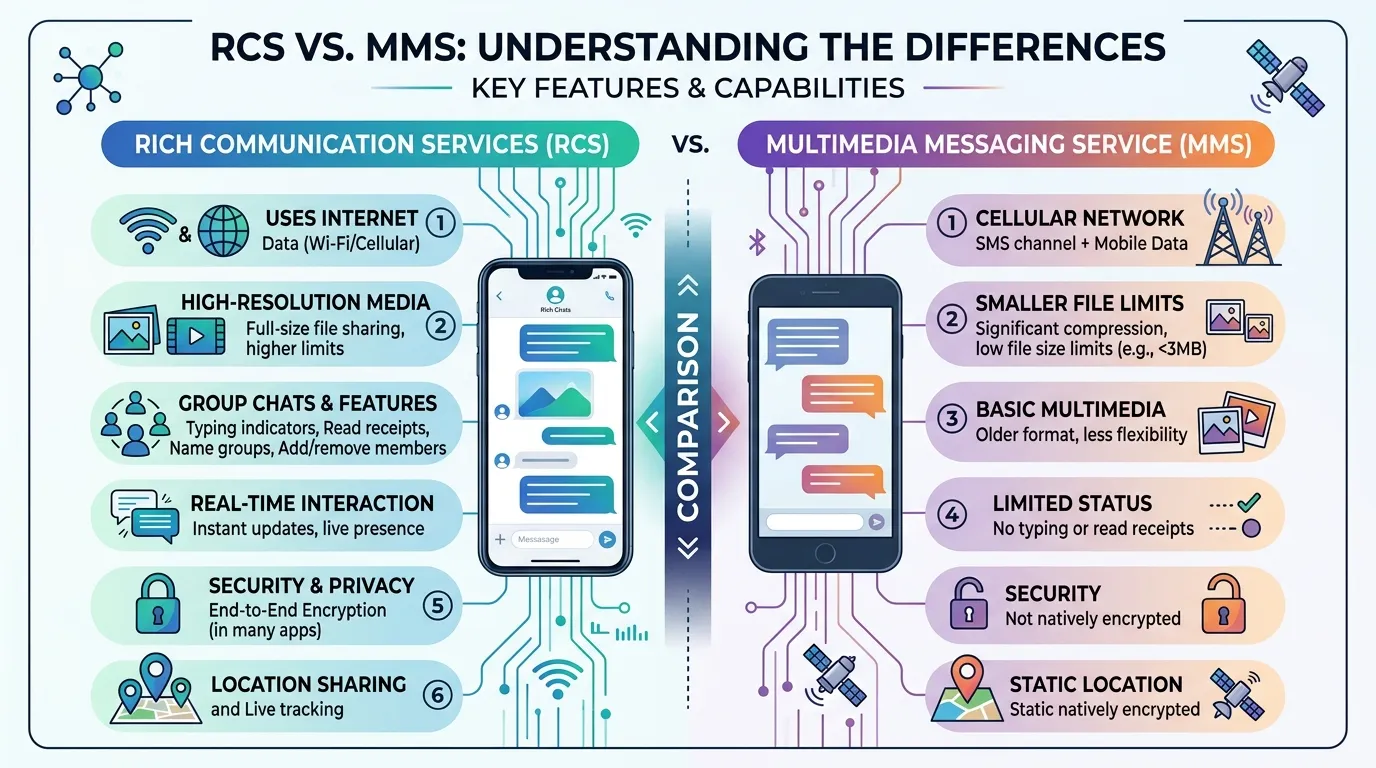
The main difference between RCS and MMS is that RCS (Rich Communication Services) uses internet connectivity to provide advanced messaging features such as read receipts, typing indicators, high-quality media sharing, and group chats, while MMS (Multimedia Messaging Service) uses cellular networks to send photos, videos, and audio with limited functionality.
Example: Sending a high-resolution photo through RCS keeps the image quality much better than sending it through MMS, which often compresses the file significantly.
Definition of RCS and MMS
- RCS (Rich Communication Services): A modern messaging protocol that enhances traditional texting with internet-based features such as media sharing, read receipts, typing indicators, and large file transfers.
- MMS (Multimedia Messaging Service): An older mobile messaging standard that allows users to send multimedia content like images, videos, and audio over cellular networks.
Example: RCS works similarly to popular messaging apps, while MMS is essentially an upgraded version of traditional SMS.
Pronunciation of Both Terms
| Term | US Pronunciation | UK Pronunciation |
|---|---|---|
| RCS | ar-see-ess | ar-see-ess |
| MMS | em-em-ess | em-em-ess |
Now that you know what these terms mean and how they are pronounced, let’s understand the key differences that matter in real-world communication.
RCS vs MMS Comparison Table
| Feature | RCS | MMS |
|---|---|---|
| Connection Type | Internet (Wi-Fi or mobile data) | Cellular network |
| Media Quality | High-quality images and videos | Compressed media |
| Read Receipts | Available | Not available |
| Typing Indicators | Available | Not available |
| Group Chats | Advanced and interactive | Basic functionality |
| File Size Limits | Much larger files | Limited file sizes |
| Encryption Support | Available in many implementations | Not supported |
| Message Length | Virtually unlimited | Restricted |
| Business Messaging | Rich interactive messages | Limited marketing capability |
| User Experience | Modern messaging experience | Traditional multimedia messaging |
Key Differences Explained Between RCS and MMS
1. Internet vs Cellular Network
RCS relies on internet connectivity, while MMS depends on your mobile carrier’s network.
Real-world example: If you are connected to Wi-Fi, RCS works smoothly even without strong cellular coverage.
2. Media Quality
One of the biggest differences is image and video quality.
RCS: Maintains higher quality.
MMS: Compresses media heavily.
Example: Vacation photos sent through MMS often appear blurry compared to RCS.
3. Read Receipts
RCS can tell you when a message has been read.
MMS provides no delivery or read confirmation beyond basic carrier support.
4. Typing Indicators
RCS shows when someone is typing.
MMS cannot provide this feature because it was designed long before modern chat experiences became common.
5. Group Messaging
RCS creates a chat-like experience similar to messaging apps.
MMS group chats are more limited and often less reliable.
6. File Sharing Capability
RCS supports larger files and richer content.
MMS has strict file-size limitations imposed by carriers.
7. Security Features
Many RCS implementations now include end-to-end encryption.
MMS lacks modern security enhancements.
8. Business Communication
Businesses increasingly use RCS for customer support, promotions, and appointment reminders.
MMS remains useful but offers fewer interactive capabilities.
Difference Between RCS and MMS: How Does Each Technology Work?
How RCS Works
RCS functions through internet connectivity and messaging servers. It acts more like modern messaging apps such as WhatsApp or Telegram.
When you send a message:
- The message travels through data networks.
- Rich media remains higher quality.
- Interactive features become available.
- Real-time status updates are displayed.
How MMS Works
MMS uses carrier infrastructure.
When you send a multimedia message:
- The content goes through the mobile carrier.
- Media is compressed.
- The recipient receives the content through their cellular service.
The system works well but lacks the advanced features users expect today.
Why Was RCS Created?
Many users ask why RCS exists when MMS already handles images and videos.
The answer is simple: MMS was designed decades ago and cannot meet modern communication needs.
RCS was created to:
- Improve media quality
- Enable interactive messaging
- Compete with messaging apps
- Enhance business communication
- Modernize traditional texting
In practical use, RCS bridges the gap between SMS/MMS and internet messaging platforms.
Is RCS Replacing MMS?
The messaging industry is gradually moving toward RCS.
Companies like Google have heavily promoted RCS adoption, and support has expanded across many devices.
However, MMS still serves an important fallback role when:
- Internet connectivity is unavailable
- RCS is not supported
- Device compatibility issues exist
For now, both technologies continue to coexist.
Difference Between RCS and MMS for Businesses
Businesses increasingly prefer RCS because it offers richer customer experiences.
RCS Business Messaging Features
- Verified business profiles
- Interactive buttons
- Product catalogs
- Appointment scheduling
- Customer support tools
MMS Business Messaging Features
- Promotional images
- Basic multimedia campaigns
- Wider compatibility
For customer engagement, RCS generally delivers a more app-like experience.
Difference Between RCS and MMS for Android and iPhone Users
Android Users
Many Android devices support RCS through the Google Messages app.
Users can enjoy:
- High-quality media
- Read receipts
- Typing indicators
- Enhanced group chats
iPhone Users
Historically, iPhones relied on iMessage and MMS. However, broader industry support for RCS has improved messaging compatibility between platforms.
This development helps reduce communication limitations between Android and iPhone users.
Difference and Similarity Table Between RCS and MMS
| Feature | RCS | MMS | Similarity |
|---|---|---|---|
| Purpose | Advanced messaging | Multimedia messaging | Both send messages |
| Media Support | High-quality media | Compressed media | Both support photos and videos |
| Network Requirement | Internet connection | Cellular network | Both require connectivity |
| Group Chats | Rich interactive chats | Basic group messaging | Both allow groups |
| Business Use | Interactive communication | Marketing campaigns | Both support customer outreach |
| Device Support | Growing support | Nearly universal support | Both work on smartphones |
| User Experience | Chat-app style | Traditional messaging | Both enable communication |
| Delivery Method | Data-based servers | Carrier-based systems | Both deliver multimedia content |
This table clearly shows the difference and similarity between Difference Between RCS and MMS for quick understanding.
Common Mistakes with Difference Between RCS and MMS
Mistake 1: Thinking They Are the Same
Many beginners assume both technologies work identically.
Correction: RCS provides significantly more features.
Mistake 2: Assuming RCS Always Works
RCS requires internet connectivity and device support.
Correction: Check compatibility settings.
Mistake 3: Expecting MMS to Preserve Quality
MMS often compresses images and videos.
Correction: Use RCS when quality matters.
Mistake 4: Ignoring Carrier Support
Not every carrier supports every feature equally.
Correction: Verify carrier compatibility.
Mistake 5: Believing MMS Is Obsolete
MMS still functions as an important backup method.
Correction: Understand that both technologies remain useful.
Real Life Examples with Difference Between RCS and MMS
Personal Use
A family shares vacation photos.
RCS preserves image quality while MMS reduces it.
Small Business Use
A local restaurant sends promotional menus.
RCS allows richer engagement and interactive responses.
Customer Support
A service company sends appointment confirmations.
RCS can include buttons and real-time updates.
Team Collaboration
Small teams share images and updates.
RCS provides a smoother group communication experience.
Marketing Campaigns
Businesses use multimedia promotions.
RCS offers higher engagement rates through richer content.
When to Use Each
Use RCS When:
- You want better media quality.
- You need read receipts.
- You want typing indicators.
- You participate in active group chats.
- You need modern messaging features.
Use MMS When:
- Internet access is unavailable.
- RCS is unsupported.
- Maximum compatibility is required.
- Basic multimedia messaging is sufficient.
Why People Get Confused in Difference Between RCS and MMS
Many users get confused because both technologies can send pictures and videos.
Additional reasons include:
- Similar appearance in messaging apps
- Automatic switching between protocols
- Carrier-specific implementations
- Limited user awareness
- Overlap with messaging apps such as Instagram and Facebook Messenger
In simple words, they perform similar tasks but use very different technologies behind the scenes.
Expert Insight
From a communication technology perspective, RCS represents the future of carrier-based messaging. It combines the familiarity of texting with features users expect from modern apps.
In real scenarios, most beginners focus only on whether messages can send photos. However, the larger advantage of RCS is the complete messaging experience—higher quality media, interactive features, and improved engagement.
Businesses also benefit because RCS creates richer customer interactions without requiring users to install additional applications.
While MMS remains valuable for compatibility, the long-term industry trend clearly favors RCS.
Frequently Asked Questions (FAQs)
What is the main difference between RCS and MMS?
RCS uses internet connectivity and offers advanced messaging features, while MMS uses cellular networks for multimedia messaging.
Is RCS better than MMS?
For most users, yes. RCS provides better media quality, read receipts, typing indicators, and richer messaging features.
Does RCS require internet?
Yes. RCS typically requires Wi-Fi or mobile data.
Can RCS send videos?
Yes. RCS supports higher-quality video sharing compared to MMS.
Why are MMS images blurry?
MMS compresses media files to meet carrier size limitations.
Is MMS still used today?
Yes. MMS remains widely supported and often serves as a fallback when RCS is unavailable.
Does RCS work on iPhones?
Support has expanded significantly, improving cross-platform messaging experiences.
Is RCS secure?
Many RCS implementations include enhanced security features, including encryption support.
Can businesses use RCS?
Yes. Businesses use RCS for customer support, promotions, notifications, and interactive messaging.
Will RCS completely replace MMS?
Possibly in the future, but MMS remains important for compatibility and fallback messaging.
Conclusion
Understanding the Difference Between RCS and MMS is important because both technologies play different roles in modern communication. MMS helped bring multimedia messaging to mobile phones, but its limitations in media quality, file size, and functionality have become increasingly noticeable as user expectations have evolved.
RCS was created to solve those limitations by introducing a richer messaging experience that includes high-quality media sharing, typing indicators, read receipts, interactive group chats, and business messaging capabilities. For most smartphone users today, RCS offers a communication experience that feels much closer to popular messaging apps while still working within the traditional texting ecosystem.

Sarfraz Ahmad is language researcher and content writer who specializes in explaining the difference between commonly confused English words. Through WordClearify, learners understand subtle word distinctions in a simple, structured, and practical way. My writing focuses on clarity, real-life examples, and easy comparisons for students, bloggers, and professionals worldwide.